Reading a book is very different from studying a textbook. With the former, you flip through pages at whatever pace you read. With the latter, you leave the textbook open to a particular page while you take notes, transcribe, or re-read text in order for it to sink in.
For this latter situation, Japanese stationery company Kokuyo detected a problem. In 2022, the company sought feedback from junior high and high school students on what their study-time paint points were. The students noted that holding a textbook open with one hand while trying to write with the other was a hassle. Some used spring-loaded clips made for the purpose, but these made turning the pages a hassle.
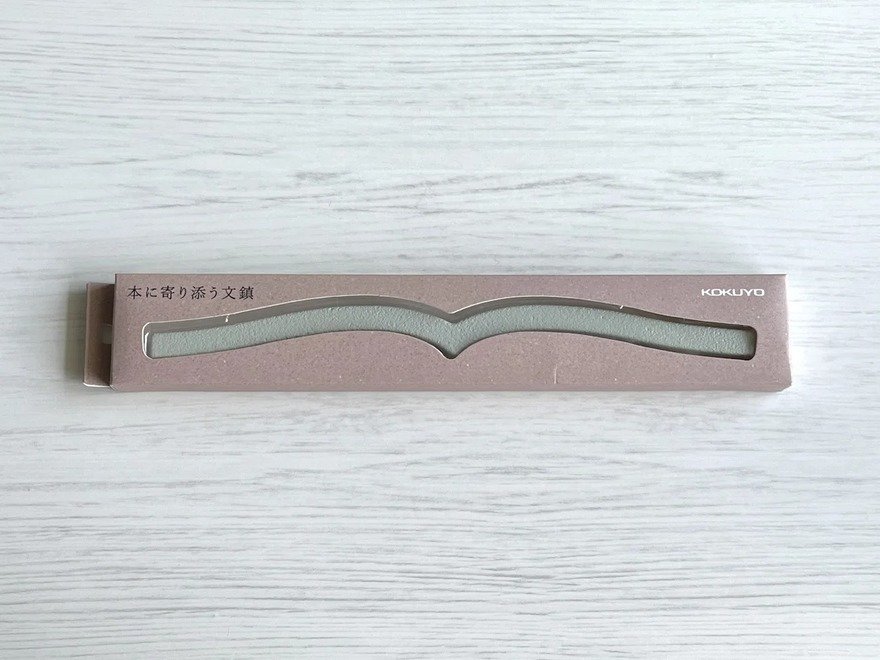
Others compensated by using a bunchin, a traditional calligraphy scroll weight that's essentially a piece of bar stock, square in cross section. But the flat bunchin didn't hold the books open well, as the flat shape only contacted the curved surface of the open pages in two places.
Kokuyo then devised this object, made out of brass. The designers arrived at the precise curvature after measuring several dozen representative books.
Hedging their bets, the company only produced a small batch of 300 units. They sold out immediately.
Concept proven, Kokuyo then put the objects—called "book-hugging paperweights"—into production in early 2024. The brass units hit the market first, followed by lower-cost steel versions in black and grey. The same year they won a stationery award.
Demand emerged for an even larger model, for thicker art books and coffee table books, and that model hit the market last month.
It's fair to say Kokuyo wouldn't have thought of this product without that crucial feedback-seeking initiative.
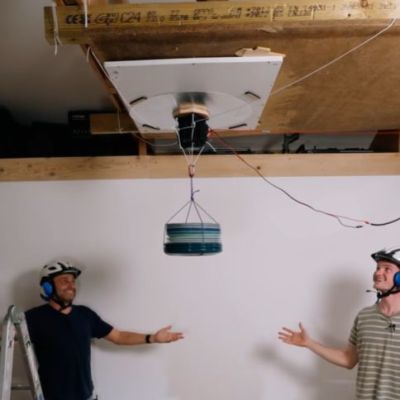
Generally making stuff stick to something like a ceiling requires resorting to suction cups, glue or something much more permanent, but [Steve Mould] starts his video featuring a playing card that is clearly defying gravity with no such measures. All that it seems to take is the small vibration motor placed on said playing card, with its vibrations making the card stick like a kind of magic trick.
Although the easy explanation would be that it creates a kind of Bernoulli grip – a common pneumatic, contactless gripping device – [Steve] explains how it’s more complex than that. This vibration adhesion effect doesn’t rely on the same constant pressure drop that a Bernoulli grip experiences within the small gap between the surface and the object. Although a gap is present, it’s much smaller in this case.
Of note is that this effect only occurs when the object is made of a flexible enough material that can vibrate along with the vibration source, in the form of a motor or transducer. As demonstrated in the video, this creates standing waves that affect the surrounding air. When pushed against a rigid surface, these standing waves change into travelling waves, which result in the air that enters this small gap constantly being pushed out and thus lowering the air pressure.
The air pressure between the rigid and flexible surfaces thus becomes lower than that of the surrounding air, creating the resulting suction effect without touching the surface as something like a suction cup would.
One can imagine practical uses for this effect much like with Bernoulli grips. These are especially common in the semiconductor industry for handling delicate items like silicon wafers with zero risk of contamination. In the video it’s shown how you can use the effect to even hold the weight of a person, though they failed to get past a few dozen kilograms with the used setup involving a 400 Watt transducer, possibly due to their ‘ceiling’ not being rigid enough, leading to energy loss.
There are also papers such as this 2025 one by [Siquan Li] et al. who suggest a ‘Micro-Vibration Adhesion’ (VBA) system to help small robots climb up walls for use in repairs and inspection. In their experimental setup they found an adhesion-to-weight ratio exceeding 51 times, making it an interesting way to have small robots defy gravitational pull without a complicated mechanism.
On the morning of May 11th, the celebrity investor Kevin O’Leary appeared on Fox Business and announced that he was under attack by Chinese agents.
For weeks, he had been going on TV and posting online to tout his project, called Wonder Valley, after his nickname from the reality show Shark Tank, Mr. Wonderful. It was going to be enormous, “the largest data center in the world,” sitting on 40,000 acres north of Great Salt Lake in rural Box Elder County, Utah. A dedicated gas power plant would tap into an interstate pipeline and generate 9 gigawatts of electricity, more than double the average consumption of the entire state. The project was coming so fast, thanks to Utah’s governor and legislative leaders, O’Leary said, that “it shows China and the rest of the world we aren’t messing around.”
But now, wearing a black baseball cap printed with the words “Utah National Security,” he told Maria Bartiromo that he had noticed something baffling. Ever since the three county commissioners unanimously approved his data center the week before, O’Leary had observed a sudden increase in people mad at him online. For this he could see only one explanation.
“Who would want us to stop building our electrical grid? Who would want to stop us from having compute capacity to develop AI? Which adversary would want that?” he asked Bartiromo. “There’s only one: It’s China.”
“I got my guys to go a deep dig into the IP addresses,” he told Bartiromo. Brandishing a sheet of paper, he began to read the names of people who had — or he believed to be somehow connected to people who had — criticized his data center online.
“Come out, come out, wherever you are and let’s shine the light of transparency on what you’re doing,” he exclaimed, looking up from his paper to address the camera and inviting them to clear their names. “It’s the CPP [sic] at work here. There’s no question about it.”
Six weeks later, Bartiromo closed out a segment by pulling up a note O’Leary had posted the day before, white text on a black background: “Recently I appeared on various news programs and would like to clarify that I have no evidence that Alliance for a Better Utah, Elevate Strategies, Gabrielle Finlayson, Taylor Knuth or Josh Kanter are funded by China or the Chinese Communist Party.”
“How the heck would anybody think you could build something out here?”
Nor was Fox News Media aware of any evidence that they are funded or directed by China or the Chinese Communist Party, Bartiromo said. “Fox News Media apologizes for the error.”
O’Leary’s “clarification” was an abrupt shift in tone. From the moment he announced the project he had proclaimed it as all but inevitable: blessed by state leadership, approved unanimously by local officials, demanded by national security, and opposed only by sinister outside forces. Now came a quiet retreat. Less than three weeks later, O’Leary and Fox were sued for defamation by Alliance for a Better Utah, Elevate Strategies, Gabrielle Finlayson, and Joshua Kanter. O’Leary and Fox moved to have the suit dismissed in late September.
Over the past five months, I spoke with more than two dozen local officials, residents, and others involved with the project, including the CEO and cofounder of O’Leary Digital, Paul Palandjian, who, after describing himself as “an open kimono” of transparency, responded to emailed questions and requests to speak with O’Leary with a message from a lawyer threatening legal action over any false statements. These interviews, along with thousands of pages of emails and text messages obtained through public records requests, show a project that moved with the urgency of an emergency. Everyone was racing — the developers against other speculators, O’Leary against rival projects chasing the same few tenants, Utah against other states, the United States against China — right up until they slammed into the residents of Box Elder County they had neglected to tell.
The very county commissioners whose unanimous approval O’Leary touted on Fox were officially told the project was coming only five weeks before they were expected to vote on it. Before then, all they had heard were rumors.
To Lee Perry, one of the three county commissioners, the rumors sounded farfetched. But in early March, he drove north out of Brigham City, Utah, past the bird refuge, past the Northrop Grumman test range, past miles of white salt flats and pale grass, to a fork in the road where Tim Munns waited in his truck.
For weeks, Munns had been texting and calling Perry and the two other commissioners to say that someone was going around talking to landowners about buying property for a data center near his ranch in Hansel Valley.
Perry was skeptical. There was nothing out there: no power, no water, only a few roads, mostly gravel, lined with tires mounted on posts and spray-painted with “keep out.” Hardly anyone lived there but Munns. He had bought his place 50 years ago because no one else wanted it. All the good pasture was already locked away in generational farms whose heirs now lived elsewhere. Now he lived there with his son Bud and Bud’s family, and he appreciated the peace and quiet.
So Munns had not been pleased to hear the data center rumors, and he had not been happy to get the call himself from one of the developers several weeks ago. If you want to talk to me, it’ll be at my kitchen table with my sons, looking me straight in the eye, he recalls telling the man. At 4:30 the next morning, Munns drove to Salt Lake City to try to get some answers. But no one at the Rural Caucus Breakfast, where people from the Department of Natural Resources and other agencies met each Friday, seemed to know what he was talking about. He contacted his state senator, Scott Sandall, and Utah House Speaker Mike Schultz. Either they didn’t know anything or they weren’t telling him.
Perry told Munns that he hadn’t heard anything about a data center either. Neither had the other two county commissioners. Perry had known Munns a long time. When Perry was serving in the state legislature, Munns had spoken with him about stopping a landfill being built near his ranch. The battle had lasted years, but in the end the landfill was stopped. Now Munns wanted Perry’s help stopping the data center. The difference was that, unlike the landfill, it wasn’t clear there was anything to stop. No one had filed building permits, no one had spoken to the planning and zoning people. Perry had heard all manner of proposals for Hansel Valley over the years: solar farms, movie studios, amusement parks. They were typically presaged by phone calls and meetings. Most never became more than that.
“Everything is about speed right now. Everything.”
But Munns was convinced something big was coming. He believed one of the landowners in the valley had already signed documents. There were rumors that the state government was involved somehow, maybe the military too. Perry was preparing to run for reelection, and the people outside Brigham City always felt ignored, so it seemed worth the drive to appease him.
The other two commissioners apparently felt similarly. They’ll be along shortly, Munns told Perry. He had asked them to come too. Then we can all hop in my truck and go see what the rumor mill is talking about, Munns said.
As they drove over the ridge, Perry saw a vast expanse of sagebrush and alkaline pools, the white shimmering rim of the Great Salt Lake just visible on the horizon, if he squinted.
“It was just kind of a desert,” Perry says. “How the heck would anybody think you could build something out here?”
A few days after Perry’s visit to the ranch, a resident asked him if he’d seen a strange announcement. It was a post on PR Newswire from a few weeks earlier saying that a “large-scale powered compute campus” was planned for “the Golden Spike District of Box Elder County, Utah,” referring to the stretch of land south of Munns’ ranch where the two ends of the first transcontinental railroad were joined in 1869. The campus was a joint venture between “West GenCo LLC” and O’Leary Digital. Combined with another O’Leary project in Canada, it would be the “largest integrated powered compute infrastructure development currently underway globally.”
“We recognize the leadership demonstrated by Governor Spencer J. Cox, Senate President J. Stuart Adams, and Utah’s federal delegation,” O’Leary wrote in the announcement. “Projects of this magnitude require disciplined execution and close collaboration with state and local leadership.”
For Perry, the document raised more questions than it answered. Such as: What local leadership? No one had spoken to him or his fellow commissioners. And also: the Shark Tank guy?
This year, Goldman Sachs estimates that $580 billion will be invested in AI infrastructure in the United States, much of it tied to the enormous data centers being built by Google, Amazon, Meta, Microsoft, Oracle, and others. Superlatives have fallen by the wayside. This is more than federal, state, and local governments are on pace to spend this year building public infrastructure, nearly twice what the US spent going to the Moon, adjusted for inflation, and almost as much as it cost to build the entire interstate highway system over 40 years. At nearly 2 percent of GDP, the AI buildout rivals the railroad boom of the late 19th century, a construction frenzy that transformed the nation, triggered multiple financial crashes, laid tracks to nowhere, created a new politics of anti-monopoly populism, and established a new oligarchy.
Data centers have existed for decades, but those of the AI boom are orders of magnitude larger than the boxy structures built to store our emails and videos. In 2019, a notably large data center might have been the size of an Ikea and consumed as much electricity as 50,000 US homes; it would probably have been located near others of its kind, clustered near electricity and fiber connections in a place like “Data Center Alley” in Loudoun County, Virginia. A modern AI data center like Meta’s Hyperion, for comparison, stands alone on 5 square miles of rural Richland Parish, Louisiana. It will be powered by 10 new gas power plants with 7.5 gigawatts of generating capacity, more than the power demand of all the 250-plus data centers in Data Center Alley combined. Meta CEO Mark Zuckerberg illustrated its size by posting an animation of a Facebook-blue building crushing Manhattan.
While size is important, speed is paramount. “Everything is about speed right now,” said Reyk Knuhtsen, an analyst at the consulting firm SemiAnalysis. “Everything.”
AI, as every executive says, is a race. Like all arms races, this one is driven more by fear than hope. OpenAI’s founders were afraid that some less responsible company might build powerful AI and that it might, per a famous thought experiment, do something like consume all the resources humanity required to survive in the single-minded pursuit of a poorly defined goal. After OpenAI launched ChatGPT in 2022, it was fear that OpenAI might build it first that prompted every other major tech company to join the race. What winning looks like may be a bit vague, but everyone is clear that losing would be existential, either for human civilization or their particular company. And because AI improves with more computing power, whoever builds the most data centers wins.
It would not be the first time speculators have come to this part of Utah seeking wealth and promising a new technological future
“If we end up misspending a couple of hundred billion dollars, I think that that is going to be very unfortunate, obviously, but what I’d say is, I actually think the risk is higher on the other side, if you build too slowly,” Zuckerberg said last September. This year the company cut construction time by putting billions of dollars’ worth of servers inside tents.
Lately, this corporate arms race has become an actual arms race, with executives and government officials invoking the urgency of staying ahead of China, which had approximately half the compute capacity of Microsoft alone at the end of last year, according to Epoch AI, but is building more. Citing national security, the Trump administration has cut environmental regulations, promised to fast-track permitting, and moved to end the requirement that the public be notified before air pollution permits are issued and construction starts. In June, the Justice Department asked a judge to dismiss an air pollution lawsuit against Elon Musk’s Colossus 2 data center, arguing that the facility was needed by the military.
Because the most profitable companies in history will pay more for a gigawatt of compute tomorrow than a gigawatt of compute next year, there is money to be made in getting them what they need as fast as possible. Even before the boom, it could take a year or more to navigate the process of connecting something as big as a data center to the electric grid, so speculators started filing requests with multiple utilities to see which came through first, jamming queues further. Rather than wait, developers started building their own power plants on-site, almost always gas, because gas offers a faster route to 24-hour power than nuclear or renewables. A report published in July by the Environmental Integrity Project counted 71 proposed gas plants in the US dedicated to serving data centers. Now large gas turbines are back-ordered for years.
“They said ‘Shh, don’t tell anybody, don’t tell anybody.’”
In addition to land and power, developers need building permits, air permits, and sometimes rezoning. Never a fast process in the best of times, it has become more fraught as local opposition has grown. At least 75 projects were blocked or delayed in the first quarter of the year. Hyperscalers will pay a premium for land that is permitted and shovel-ready, sometimes 20 times what the land was worth before. They are paying for speed.
The business of putting these ingredients together is known as “powered land assemblage.” Commercial real estate firms and dedicated companies like Cloverleaf Infrastructure are searching the country for suitable plots and power. So are countless independent operators, sometimes called “data center wildcatters,” freelance speculators who might look at acres of unzoned farmland north of Great Salt Lake and see an opportunity.
It would not be the first time speculators have come to this part of Utah seeking wealth and promising a new technological future. A few miles south of Hansel Valley, two locomotives face each other across the final stretch of the transcontinental railroad alluded to in O’Leary’s press release. It is a monument to the era’s industrial achievement and to its frequent wasteful inefficiencies. With the companies paid by the mile and racing to claim more territory than their rival, their crews actually met much earlier and kept going, grading parallel roadbeds past each other for hundreds of miles until Congress ordered them to stop.
The man who called Munns inquiring about land was Austin Pritchett, an entrepreneur based in Alpine, Utah. Pritchett earned an MBA from Cornell in 2016, according to his LinkedIn, and practices a form of real estate development that finds profit in getting raw land zoned and permitted for construction. Municipal records illustrate one version of the model: Partner with owners of farmland near an expanding city, line up a homebuilder willing to buy if the land can be developed, and seek the local approvals needed for construction. The process can take years and might never pay off, but it is a way to profit off real estate without needing to purchase land outright. Pritchett also sells online classes teaching his approach for $25,000 a course.
“Builders need entitled land,” a page for one of Pritchett’s workshops reads. “They don’t want to spend 12–18 months navigating zoning boards. Hand them a permitted site and they’ll pay a premium typically 2–3x what the raw land cost.” His previous publicly documented projects were mostly suburban housing, but last October, he added a new lesson: “New Portal and Data Center Land (Current Gold Rush).”
By November 2025, Pritchett was approaching landowners in Hansel Valley. He was very polite, according to a landowner he met with at the time, LuAnn Adams. “They said, ‘Shh, don’t tell anybody, don’t tell anybody,’” she later said at a county meeting. “So I kept it to myself for a little while.”
Pritchett later said he was drawn to Hansel Valley because much of the land was owned by only a few people, making it straightforward to acquire. But the most enticing thing it had to offer was the 42-inch-diameter gas pipeline running through it, offering a fast route to abundant power.
A data center would be a far bigger project than anything Pritchett had handled before. He contacted a fellow Alpine resident, former Congressman Jason Chaffetz. Chaffetz, a Fox News contributor, texted O’Leary, who he knew from appearing on television together. O’Leary had passed on Chaffetz’s past pitches, Chaffetz said, but this one piqued his interest.
“I like interacting with Kevin because he responds right away,” Chaffetz says. He introduced O’Leary to Pritchett and will be compensated if the project “comes together,” he said, though the details of the arrangement are bound by an NDA.
On December 16th, a lobbyist emailed the governor’s scheduler to say that O’Leary would be in town in a few weeks. “KO from Shark Tank would like to meet with the Gov on Jan 8 to discuss data centers in UT,” the lobbyist wrote.
“Austin told us, day one, it was the biggest single project in the history of mankind.”
Gov. Spencer Cox and the Utah legislature had been working to make the state attractive to data centers, which are an appealing source of tax revenue for state governments. Utah already exempted data centers from paying sales tax on certain equipment, and in 2024 Cox launched “Operation Gigawatt,” an effort to double the state’s electricity generation, in part to support all the data center developers who had expressed interest in coming to Utah. Last year, the legislature passed a law that allows data centers to build on-site power plants.
O’Leary arrived at the Statehouse on the morning of January 8th and had his photo taken sitting behind the governor’s desk. The next day, he appeared on NewsNation and discussed meeting Cox and Senate President J. Stuart Adams. Adams, seen by many as the most powerful political figure in the state, was also the chairman of the Military Installation Development Authority (MIDA), a state development authority created to facilitate projects connected to military installations. “They rolled out the red carpet for my entire team,” O’Leary said. “They’re really going to accelerate policy in terms of getting permits.”
When Pritchett came out to the Munns’ property two months later, he described a project that already sounded far along, according to Tim Munns and his son, Bud. The state was involved. Pritchett said he already had the necessary land and water rights under contract. He just wanted a bit of the Munns’ property on the margin, and if he didn’t get it, the Munnses understood, he had other options.
“He wasn’t pushy,” Bud says. “He just flat laid out the facts and said, ‘Now you guys decide what you want to do.’”
As for what was coming, Bud couldn’t wrap his head around it. He didn’t know what MIDA was, though he serves in the Air National Guard and the idea that the data center might have a military use appealed to him. He’d watched Shark Tank a few times but had to Google which one Kevin O’Leary was. As for what the valley would look like after the “biggest data center in the world” landed in it, he had no idea. “Anything of the magnitude of what he described going down there was a little bit of a shock,” Bud says.
Tim told the commissioners, and with the project sounding increasingly real, they redoubled their efforts to figure out what was going on. One of them called their state senator, Scott Sandall, who said he would ask around. Soon afterward, Commissioner Perry received a text from Paul Morris, then the executive director of MIDA, saying that he’d gotten his number from the senator and that he would be at the county courthouse the next morning to “provide an update.”
“You have no idea what you’ve started.”
Morris, along with the developer, Pritchett, arrived at the Box Elder County Courthouse in Brigham City on the morning of March 25th and informed the commissioners that their county would be getting an AI data center powered by a 9-gigawatt gas plant. Morris said that 40,000 acres had been secured for the project and tax subsidies had already been negotiated — the developers would pay no property taxes on its servers, get 80 percent of their property taxes on buildings refunded, and pay a highly reduced energy tax.
What they needed now was for the commissioners to formally approve the “MIDA project area,” an “irrevocable” decision, according to the MIDA statute, that would put the agency in charge of all land use decisions from that point onward, essentially making the agency its own municipality.
“We kind of ripped into him for not talking to us,” Perry says.
Morris and Pritchett apologized for not telling the commissioners earlier, Perry and Tyler Vincent, the commission chair, said. Actually, the commissioners were told, a lobbyist had said that he had already spoken to the commissioners and that they were on board. When the commissioners demanded to know who this lobbyist was, Morris refused to name him.
But it was too late to slow down. Morris told the commissioners that if they didn’t sign the county consent before the end of April, financing for the deal would fall apart.
Anyway, the data center would be good for Box Elder, Morris tried to convince them. Even after the tax subsidies, Box Elder would still get tens of millions in revenue.
The commissioners were unswayed.
“You have no idea what you’ve started,” Vincent recalls telling Morris. “You just screwed these two commissioners, they won’t win their races because of what you’ve done,” he said, pointing to Perry and the commissioner Boyd Bingham, who faced primaries in June.
The commissioners were still dealing with the fallout from “the fairground debacle,” the weeks of outrage and apologies resulting from its decision to end subsidized horse stall rentals at the county fairground without sufficient public input. “What you’ve just done is going to make that experience look like a walk in the park.”
“I’ve never seen anything go this fast in all the time I’ve been in politics. You can’t even build a house that fast.”
Perry didn’t believe MIDA’s deadline. Born and raised in Box Elder, Perry had joined the highway patrol and served on the governor’s security detail in the early 1990s. Organizing for a pay raise opened his eyes to what politics could accomplish, and after his local representative failed to show up for an event he organized or respond to repeated emails, he ran against him and won. He served five terms and retired to work in the private sector but got recruited to run for county commissioner instead. Even with all that experience, the speed of the data center project was new.
“I’ve never seen anything go this fast in all the time I’ve been in politics,” Perry said. “You can’t even build a house that fast.”
But MIDA moved quickly, emailing the commissioners an agreement to be approved on April 15th, then PR material for after their vote. The commissioners had some complaints about the language. “From what we’ve seen, Kevin O’Leary, the investor, has also been using similar messaging about the county ‘inviting’ the project to come. Which is just the wrong word,” a county attorney wrote.
Because the land was unzoned and the developers were building their own power and water systems, the commissioners’ options were limited. They could refuse to consent to MIDA’s project area, but they worried that the developers might sue. In his research, Perry came across the case of Saline Township in Michigan, where the town board rejected a rezoning request for an OpenAI data center. The developer sued, alleging exclusionary zoning. The town settled, and the data center is being built anyway.
If a data center was coming, the commissioners felt that the developers should pay for the cost of the additional services it would require, an amount the county estimated to be $16.2 million. The county, Morris, and the developers haggled over the terms as the April 15th target passed and moved to April 22nd, the commission’s next scheduled meeting.
A public notice was issued for the vote. It appeared on the county’s upcoming agenda as item 9A, “Interlocal Agreement #26-15 Between Box Elder County and the Military Installation Development Authority (MIDA) Relating to the Stratos Project Area,” using a project name Morris said MIDA liked because it was Greek for “army.” There was no mention of a data center.
Anticipating blowback, Perry texted Pritchett to make sure that the landowners would show up to publicly say they were in favor of the project.
But with the contract still in flux, the commissioners postponed voting to a later meeting — “If you would like to speak to that, please fill a form out,” Vincent said — and the meeting instead became Stratos’ quiet debut. It was a small, subdued event. Shane Holmgren, the largest landowner and the first approached by Pritchett, was “100 percent supportive of this.” Others were less enthusiastic, worrying about traffic or water use. When Vincent asked for a show of hands for who was in favor of the project, someone shouted out, “What about those of us in the impact area who are undecided because we need more information?”
“The only one that enjoys change is a baby,” Tim Munns said, philosophically, at the meeting. After days of thinking and discussions with his family, he had decided to sell. It had been the military connection that convinced him. That and the project’s inevitability, he said.
“If it’s going to happen and we’re going to watch it happen in this valley, then we’re going to be at the table instead of being on the menu,” he later tells me.
Two days later, on Friday morning, MIDA held its own meeting to approve the project area. The paperwork wasn’t quite finished, Morris said, but it was 95 or 98 percent of the way there. Nor had the county itself given its consent. Morris said the commissioners would meet at 5 that afternoon — “the fastest they could put it together” — though the commissioners would again delay.
MIDA’s event was a more celebratory affair, consisting mostly of Morris and other MIDA officials marveling at the speed at which they had moved. O’Leary appeared on a video call, taking a seat before a photo of skyscrapers.
“Forty thousand acres, I don’t think there’s a bigger facility in the world than this.”
“What’s extraordinary about Utah is I heard about this opportunity just five months ago. That’s it. And here we are on the cusp of doing something absolutely phenomenal together. That’s leadership,” he said, thanking Cox, House Speaker Schultz, MIDA, and Adams, the Senate president who was also the chairman of the MIDA board. It was important to move fast, O’Leary said, because it was a race, not just with China, but with other data center projects, to win tenants. “But we have tenants knocking on our door,” O’Leary said. “My job is going to tell the world what we’ve done here.”
This was something O’Leary was well suited to do. He had spent two decades turning himself into one of the business world’s most visible promoters. O’Leary came up through educational software in the 1990s, acquiring rivals like The Learning Company, which he sold to Mattel in 1999 for roughly $4 billion. It was a disaster for Mattel, which was sued along with O’Leary for misrepresenting The Learning Company’s financial state. (Mattel settled.) Four years later, O’Leary cold-called an executive at a Canadian business channel with the pitch that he was good on TV, according to a 2012 profile by The Globe and Mail’s Report on Business. He got a role as a brash conservative news commentator, then as a judge on the CBC reality show Dragons’ Den, where he dispensed brutally frank appraisals of aspiring entrepreneurs’ business plans. He then reprised the role for the American version, Shark Tank. Last year, he played the villainous tycoon in Marty Supreme. An avatar of unapologetic wealth onscreen and off, he appeared on the Oscars red carpet wearing a $30 million basketball card encased in diamonds on a chain around his neck with matching Rolex and Cartier watches, one on each wrist.
He has parlayed his fame into several businesses, including O’Leary Ventures, O’Shares Investments, and O’Leary Fine Wines. In 2021, he took stakes in FTX in a deal to become a “spokesperson and ambassador” for the company, which collapsed the following year and whose CEO is currently in prison for fraud. His first foray into data centers came in 2022, when he invested in and promoted a bitcoin miner called Bitzero. (After posting net losses, the company recently repositioned itself as an AI compute provider.) In 2024, O’Leary announced a data center of his own, under his brand O’Leary Digital, in Greenview, Alberta. It would be enormous, according to the announcement: 7,000 acres, powered by a 7.5GW gas plant, later upgraded to 9GW.
“Introducing Wonder Valley: The Largest AI Compute Data Center Park on Earth,” he posted on X at the time, embedding a video of an eagle flying through renderings of a lush and futuristic campus.
“Wonder Valley Utah” would apparently also be the world’s largest. “Forty thousand acres, I don’t think there’s a bigger facility in the world than this,” O’Leary said on Fox and Friends three days after the MIDA vote. “We’re going to build the largest data center in the world here,” he said hours later in another Fox appearance. Then he posted the clip to his 4 million LinkedIn followers under a red banner that read, “WE’RE BUILDING THE WORLD’S LARGEST DATA CENTER IN UTAH.”
O’Leary’s hyperbole can be best understood as a pitch to the hyperscale tech companies about what the data center could be if they were to sign on as tenants, the investor Paul Kedrosky says. These investors don’t care whether AI turns out to be profitable. What they care about is that a very profitable tech company is going to occupy the data center and be contractually obligated to pay them a fixed return no matter how AI turns out. “It could be hide-and-seek competitions going on inside of these things,” Kedrosky says. “What they care about is how pristine the credit is of the hyperscalers involved.”
Mixed in with real construction projects are lots of paper data centers, speculative ventures announced as if they were shovel-ready
For developers, this presents what Palandjian, the CEO of O’Leary Digital, calls a “chicken-and-egg problem.” In order to finance construction of a data center, you need an anchor tenant, but all tenants care about is speed, so the best way to attract one is to get everything aside from the actual data center — land, power, permitting — ready to go. “If you’re talking to a hyperscaler today, they’ll say, ‘Don’t even talk to me unless you can show me a pathway to potentially lighting up my first data centers by mid 2028,’” Palandjian says.
This dynamic is part of the reason there are so many “world’s largest data centers,” more even than O’Leary’s two. Mixed in with real construction projects are paper data centers, speculative ventures specced out to their maximum theoretical capacity and announced as if they were shovel-ready with the aim of catching the attention of a hyperscale tenant. Many amount to nothing or very little. It’s been nearly two years since O’Leary announced his first Wonder Valley, in Alberta. There is still no publicly announced tenant, and according to the Greenview planning department, no permit applications have been filed.
The result is a structural dissonance in the data center buildout, where projects are pitched to a small group of tech titans in grandiose terms that to people who live near these projects sound maximally nightmarish. O’Leary brought a showman’s flair to the job.
“Kevin O’Leary isn’t pitching Utahns when he says, ‘We have 40,000 acres. It’s going to be the biggest data center ever,’” said Clint Betts, CEO of the Utah tech industry group Silicon Slopes. “He’s not even thinking about Utahns. He’s pitching potential tenants. And I think that’s what pisses Utahns off.”
Whether O’Leary’s pitch reached its intended audience was unclear. It unquestionably reached Utahns.
Brenna Williams heard about the data center at the grocery store. “You couldn’t walk down the hall someplace or go to McDonald’s or go out for coffee. Everybody was talking about it, and nobody was happy.”
Williams was particularly unhappy. In November, Joule Capital Partners had broken ground on a 4,000-acre data center campus 9 miles from her second home in western Utah, where she had planned to retire. A month later, work began nearby on another data center, this one 10GW and advertised as the world’s largest. Now there was a third data center, this one near her actual home in Box Elder, where she had raised two kids stargazing and rock hunting in the desert, also calling itself the world’s largest.
“We have to report on our neighbors if they’re watering at the wrong times or on the wrong days. But we have water to cool a power plant?”
Williams, a former government econometrician and college instructor, speaks methodically in a calm monotone as she enumerates the many reasons why the data center “doesn’t make sense” — a refrain. First among them is the water, an acutely sensitive issue in Utah in part thanks to Gov. Cox himself, who has declared repeated drought emergencies and urged residents to take shorter showers and cut back on watering their lawns. There is no more potent symbol of the state’s water crisis than the Great Salt Lake, which has been shrinking for years, exposing heavy metals on its lakebed that become airborne dust. Now here came a data center on its northern shore, or where its northern shore would have been if it hadn’t receded several miles.
“We have to report on our neighbors if they’re watering at the wrong times or on the wrong days,” Williams says. (There’s a hotline.) “But we have water to cool a power plant and cool the data center? It doesn’t make sense.”
The question of data center water use is best thought of as a tradeoff between water and energy. Servers produce heat, and that heat must be removed from the building. An energy-efficient way of doing so is to transfer the heat into water, some of which evaporates, but the amount of water lost to evaporation can be significant. Google’s data center in The Dalles, Oregon, is cooled in this manner. A much smaller facility than the gigawatt-scale projects being proposed today, it consumed about 469 million gallons of water in 2025, about as much as 17 golf courses.
“We’ve been told that that needs to happen this month, whether that’s true or not.”
Heat can also be ejected directly into the outside air, similar to a home air conditioner’s exhaust. This method can use very little water, but it uses more of the electricity data centers already consume in immense quantities — electricity that, depending on how it’s generated, also uses water. According to a 2024 analysis from Lawrence Berkeley National Laboratory, such “indirect” water consumption is about 12 times greater than the amount of water data centers consume on-site. For data centers like Stratos that intend to generate power on-site, this water use — and other externalities that once happened somewhere else on the grid — becomes direct and acute.
As is currently common in the industry, the Stratos developers and MIDA officials emphasized that the data center itself would use a “closed-loop cooling system” that would be filled once and reused. The county’s agreement with MIDA even specifically forbids water-intensive evaporative cooling. But the agreement also stipulates that none of these protections apply to the power plant, and it is the power plant that is listed as the primary use in the project’s applications for water rights.
Williams did not typically attend commission meetings, but when one was scheduled for the Monday after the MIDA vote, she showed up early and took a seat inside the courthouse, intending to make her displeasure known. So did around a hundred other people, more than the room could fit. They stood in the back, some holding signs, filled the hallway outside, spilled out onto the front steps.
They would not, however, get the opportunity to speak. “Public comment was held last week,” Vincent replied to a shouted question, though at that first meeting, where attendees primarily consisted of landowners the developer had personally invited, Vincent had promised a second comment period at the next meeting.
“I didn’t hear anything about it!” someone shouted.
“It was noticed,” said Vincent, banging his gavel.
“Very quietly!”
Vincent threatened to remove hecklers.
The commissioners went on to question Pritchett and a MIDA official named Hilary Venable for an hour with vague results. No one could explain what percentage of the facility was for military use or even what that use would be.
Regarding the water use of the gas plant, Pritchett said they would use “new air-cooling technologies that are zero water,” or at least he was pretty sure they would — the “exact technology partnerships of the newer power technology are not totally solidified.” (“I’m hearing a lot of ‘if’s,’” someone shouted from the audience.) When Perry asked why the commission was being rushed, Pritchett replied that actually, he was being rushed too. That zero-water turbine was slated to go to another state, Morris previously said, but Utah had the chance to snag it if they moved fast. “We’ve been told that that needs to happen this month, whether that’s true or not,” Pritchett said. “That’s the reason for the rush.”
Perry’s announcement that the commissioners would postpone their vote for another week to sort through all the questions they’d received from constituents was met with cheers from the audience. Next time, Perry said, the meeting would be held at the county fairground to accommodate the apparently large public interest.
According to an August survey from Heatmap, 75 percent of Americans would oppose a data center being built near them. People feel more positively about nuclear power plants by a 20-point margin. Dislike of data centers might be the most unifying issue in America today, though it is less that everyone is in agreement, one Utah activist told me, than that data centers provide something for everyone to hate.
Some oppose data centers on environmental grounds. Others find them ugly. They are such large industrial projects that solving one problem tends to raise others: Avoid raising electricity prices by building a power plant and air pollution and noise become problems. When Pritchett tried to assuage water concerns by promising an air-cooled gas turbine, a physics professor at Utah State University, Robert Davies, did some back-of-the-envelope math and estimated that Stratos would emit enough heat to raise nighttime temperatures by up to 12 degrees, above the dewpoint, potentially creating a Sahara-like climate in the valley.
That these enormous projects often arrive with little warning only intensifies the opposition, especially because their approval generally runs through local government. Americans may distrust Congress, corporations, and the media, but a majority does still trust their local government. It’s where people still expect democracy to work. The ability of small groups of citizens to block development is so great that some see it as a national crisis; in a county like Box Elder, residents can complain to their commissioners about fairground price hikes and elicit actual policy changes.
There was a different set of rules for the O’Learys and Zuckerbergs of the world
That trust helps explain the extraordinary emotion on display at data center meetings: Across the country, residents scream at their commissioners, sometimes break down in tears, after learning that their representatives approved a project they barely knew existed. The outrage is a level above disagreement with a land use decision. It feels like betrayal.
In Utah, the speed at which Stratos seemed to materialize was taken by some as evidence of conspiracy. Unsubstantiated claims of bribery were leveled at everyone from Cox, whose family founded the telecom company CentraCom, to the commissioners, because they might get seats on a MIDA advisory board. Dozens of people submitted comments to the county’s website alleging corruption and “back-room deals.” How else could something so big come together so fast?
Few believed the developers’ claims about water use and few trusted government assurances that Stratos would need to follow state environmental regulations no matter what technology it ended up using. Loopholes would be found, promises broken. There seemed to be a different set of rules for the O’Learys and Zuckerbergs of the world; just look at the speed at which this moved, one resident said, compared to the meetings and permitting he’d have to go through in order to install a swimming pool.
Strange political alignments began to form. Progressive activists like Deeda Seed, senior campaigner at the environmental group Center for Biological Diversity, found herself on the same side as Phil Lyman, a far-right former state representative who in 2020 was pardoned by Donald Trump for a conviction resulting from leading an ATV ride through a canyon closed to protect Native American cliff dwellings. Seed worried about the environmental impacts. Lyman hated the tax incentives and back-room dealing. Both felt democracy had been flouted and the people cut out of the process, a sentiment that Cox doused with gasoline when he said that slowing development with lengthy processes was “the dumbest thing ever.”
“We think that taking time makes things better or safer. It absolutely does not,” Cox said.
Even law enforcement officials monitoring the growing backlash noticed that something unusual was happening. Ahead of the commission meeting, an intelligence analyst with the Utah Statewide Information and Analysis Center (SIAC) emailed a sheriff to say that while there were no concrete threats, people were “very angry,” and at least two of them had posted GIFs of guillotines. Notably, the groups attending the meeting were of “opposing ideologies” and typically only meet when counterprotesting each other. “However, in today’s circumstance, they will be in the same space for the same purpose.”
“You can vote no, and we’ll find another way to make it happen”
On the advice of the law enforcement, the commissioners parked on the side of the road several miles from the fairground and were taken by squad car to the metal hangar-like hall where the meeting would be held. They toured the space — a basketball court with its bleachers withdrawn and scoreboard dark, rows of folding chairs facing a table draped in American flag bunting — and went to a back room to wait and go over their notes as they listened to the crowd gather outside.
Over the preceding days, the commissioners had been inundated with thousands of messages urging them to slow or stop the project. They had also received several calls from state lawmakers and officials telling them to vote yes.
“Would love to talk to you about the AI project if you have some time,” state Rep. Tom Peterson texted Perry on April 27th.
“Hey Lee, Scott here. Just wanted to, uh, pick your brain, compare a few notes, share a few thoughts on the data center when you get a minute, give me a call,” state Sen. Sandall said in a voicemail the next day.
Perry also got calls from the governor’s office and from the speaker of the house, he said. “They all kept saying, This is a great thing for the state of Utah. We need to get it done.”
As the date of the fairground meeting neared, MIDA became increasingly forceful, Perry and Vincent both said. MIDA had now given them one supposedly final deadline after another, and the commission had missed each one. Now a fourth vote was scheduled, and the public opposition was only growing.
“Please be quiet. Be courteous. Isn’t that who we are in the state of Utah?”
“That’s when they came in and told us, ‘Well, if you guys just really feel like you have to vote no, you can vote no, and we’ll find another way to make it happen,’” Perry said. “‘But just so you know, you won’t get any of the protections or any of the guardrails that you’ve negotiated, and you certainly won’t get the amount of tax money that we’ve been talking about.’”
Morris did not respond to requests for comment.
The lawyer the commission had retained agreed that the county had little power to stop the project, Perry and Vincent say. Still, Perry wrote two speeches the day before: one where he voted yes and another where he voted no, acknowledging the public outrage and warning that they may all have to pay higher taxes to fund the legal fight likely to come. Despite the furor, he did not have a clear sense that that was what his constituents wanted. Many of the messages he’d received came from nearby counties — Utahns who cared about the lake and air pollution but would not have to fund the county’s possible legal defense. Nor would they see their taxes drop once revenue from the data center started coming in. Perry would prefer to publicly discuss these pros and cons, but they had been too busy figuring out what the project even was and now there was no time. Ideally, he says, the state would have convened these town halls and also “come and told the public how we’re having this crammed down our throat.”
“For hell’s sake, grow up!”
When the commissioners finally walked out, they saw more than a thousand people filling the hall, many holding signs. They were greeted with applause as they took their seats. But the mood shifted the moment Vincent said, “Just a couple of housekeeping things: As last Monday, there will be no public comment period.”
The crowd erupted in boos.
“Enough, enough. Quiet down right now,” yelled Vincent, his voice going hoarse, banging the gavel. “Please be quiet. Be courteous. Isn’t that who we are in the state of Utah?”
Vincent proceeded to read from a prepared statement.
“It will generate jobs and economic investment in infrastructure—”
Booing.
“The closed-loop design means the data center won’t consume any more water than a typical office park or an— “
Booing.
Williams, in the audience, was frustrated both by what she was hearing and with the hecklers, because she wanted to hear what the commissioners had to say. Some in the audience called for quiet, but they were overpowered by the crowd, which roared at every mention of electricity, water, or possible benefits.
“Plus, it will create jobs, boost our local economy, and strengthen our military for years to come— “
Booing.
“We tried to get the department of Air Quality to come, but since no application has been filed, they would not. However, I was able to speak with an engineer—” the county attorney said, to more boos.
“Did you mention something about the dark sky thing?” Bingham tried to ask the county lawyer. “We had an agreement with MIDA on that.”
Yelling, booing, whistling.
“For hell’s sake, grow up!” Bingham shouted, eliciting more and louder boos.
A contingent began to chant: “People over profit!”
And with that, the commissioners stood, walked off the stage, and went into a back room, their contingency plan if the crowd became unruly. After 15 minutes of confused milling about, the crowd watched as a projection screen descended from the ceiling and the commissioners reappeared on video, now seated behind a folding table in a small fluorescent-lit room, police officers standing by the doorway. The meeting resumed and they voted to approve the project area. Behind the door, they could hear the crowd chant, “Shame, shame, shame.”
The sheriff told the commissioners to wait for the crowd to disperse before heading home. That evening, Sen. Sandall texted Perry, “You did the right thing.”
The image of elected officials fleeing their constituents to approve a data center in a literal back room was immediately explosive. Video of Bingham’s “For hell’s sake, grow up” was clipped, turned into songs, and seen by millions. O’Leary’s boasts about a 40,000-acre site was transformed through viral telephone into a data center that was itself three times the size of Manhattan, depicted with an image of a building footprint overlaying the city. Davies’ heat analysis headlined countless posts about the project releasing heat equivalent to 23 atomic bombs each day, the most alarming of several comparisons he made. There were many, many posts about billionaires and the Great Salt Lake and the biggest data center in the world, often illustrated with pictures of grinning O’Leary fanning himself with hundred-dollar bills. Data center outrage has become a social media staple, and it would be hard to design a more incendiary set of ingredients than Stratos.
“You could feel the heat coming off the keyboards, there was so much anger.”
All manner of online personalities converged on the story. There were environmental activists, travel influencers, guys in windowless rooms talking about the technocratic superstate, and hustlers shilling get-rich-with-AI courses trying to draft off the viral fury. The comedian Walter Masterson went to O’Leary’s neighborhood in Miami Beach with a petition to put the data center in his backyard. A prominent Utah drought-resistant gardener posted about boycotting the nursery of Sen. Jerry Stevenson, who sits on the MIDA board; when a reporter approached Stevenson in the parking lot, the senator called “the whole thing such a bunch of baloney” and slapped the phone out of his hand.
In Box Elder, Williams had gone home from the fairground vote furious and logged in to Facebook. So had dozens of other residents. “You could feel the heat coming off the keyboards, there was so much anger,” she said.
Brigette Cottam, a Brigham City mother of four, had missed the meeting but saw the video of Bingham shouting “for hell’s sake, grow up” — “Oh, they yelled at us?” — and also logged on. “Doomscrolling, I just saw post after post after post, like, what do we even do about this? What can we do about this?”
So she googled what to do when your county commissioners pass something nobody wants. The answer was to file a referendum, in this case one challenging the county’s consent to the project. Facebook pinged with volunteers. “Me, me, me, me. It was like ‘I am Spartacus,’” Cottam said.
The next morning, Williams, Cottam, and three others met at the Box Elder County Courthouse to get the paperwork. Later that week, they convened again, now with two dozen people around a nearby picnic table, and assigned roles. They called the group Box Elder Accountability Referendum, or BEAR, and started referring to themselves as “mama bears” in their posts. Soon they had 2,500 volunteers signed up.
Box Elder is a conservative county. Nearly 80 percent voted for Trump in the last election, including Williams. She describes the BEAR coalition as spanning “MAGA to Marxist.” Her husband is MAGA; her son, Marxist. They try not to discuss politics, except the data center, which unites them.
Utah’s Republican primary was just over a month away — often the decisive election in the deeply Republican state — and as outrage over the data center grew, politicians who had been instrumental in its arrival began distancing themselves from the project.
Cox said that he’d heard from Utahns with “real concerns” about environmental impact and tweeted that the developers had agreed to seek approval for the project in phases rather than all at once, something that almost certainly would have been the case anyway. “The process was not good,” Cox later said, adding that he had long been concerned about MIDA. “That was not a decision that was made by me or the legislature.”
“Hopefully some people will lose attention to the matter and others will see it as a win.”
House Speaker Schultz, who Perry said had called him before the vote to tell him the project was good for Utah and the county, now said he supported BEAR’s referendum.
The backtracking infuriated Adams, the Senate president and MIDA chair, who now found himself alone in an increasingly competitive primary challenge, according to a source with knowledge of his campaign.
With state officials running for cover, the Box Elder County commissioners were left defending their vote as the least bad option. The public’s fury did not abate. Police were stationed outside the commissioners’ homes. Someone emailed Perry telling him to light himself on fire. Perry choked up speaking about threats he’d received with news station KSL. Soon, they stopped giving interviews at all. Their campaign signs lining the streets of Brigham City were defaced with red spray paint reading “AI traitor.”
The developers too attempted an appeasement campaign. This wasn’t going to be the ugly concrete box you’re thinking of, Palandjian told the design publication Dezeen, unveiling renderings depicting a modernist glass building nestled beneath mountains glowing at golden hour. Yes, there might be a “man camp” housing the thousands of construction workers, but it was going to be the best man camp you’ve ever seen. “We want this to be the sexiest, coolest construction posting in America,” he said. “We want a beautiful, poetic design.”
The developer withdrew a water rights application that had garnered thousands of protests. It was a tactical move. Pritchett texted Perry that their plans remained unchanged. “Hopefully some people will lose attention to the matter and others will see it as a win,” Pritchett wrote.
They did not. In fact, the move only made people angrier, because filing a protest required paying a fee. Now 3,000 people felt O’Leary had personally stiffed each of them out of $15. A local professional skier and environmental activist posted a video of herself calling the Division of Water Resources and confirming that no, they would not be getting refunds.
“What the hell are they taking Chinese money for?”
In any case, all these conciliatory gestures were doomed to fail because at the same time, O’Leary was repeatedly going on television and posting about how his critics were bussed-in “professional protesters” working for the Chinese Communist Party.
“What the hell are they taking Chinese money for?” O’Leary exclaimed on May 20th, in one of several similar appearances on Fox during the period. “All proven all through these nefarious entities,” he said, holding up a colorful chart and claiming to have received a call from five government “special agents” interested in his investigation.
A few days later I called Palandjian, who went into more detail. “Everybody’s freaked out about AI and what it could do. AI is here already. We have the ability with our data scientists to see, you see those same five protesters that are in Utah protesting this project were in Michigan protesting that data center project. They’re on college campuses protesting and spouting antisemitic things. It’s all part of the same thing. And before that, BLM and antifa.”
When I asked whether he had performed facial recognition on the protesters, he said no, he meant that those tools existed, but “we’ve seen JPEGs.”
Maybe on a different issue O’Leary could have mustered some politically polarized support. With data centers, though, he encountered mostly skepticism, even from the right. When he went on Tucker Carlson’s show, Carlson, ever an astute reader of the national mood, dismissed O’Leary’s China fears. Instead, he repeatedly challenged him to explain why data centers were good for Americans rather than being an aesthetic “offense against God and nature” that raises their energy bills and takes their jobs.
As for Utahns themselves, having a Canadian celebrity tycoon accuse them of being bussed-in Chinese agents just made them even angrier.
By the time I arrived in Box Elder in mid-May, it seemed that O’Leary had succeeded in uniting the entire state both against his data center and himself personally. The activists he had called Chinese agents were doing a brisk business selling merch making fun of his “Utah National Security” hat. At a protest at the Capitol, there were as many signs attacking O’Leary as there were about data centers: “Keep sharks out of Great Salt Lake,” “Mr. Terrible,” and many jokes about being paid by China. At a gathering at the fairground, a resident prefaced his concerns with his Utah bona fides: third-generation Utahn, grew up duck hunting, and one of the lobbyists O’Leary hired, Casey Hill, “is literally my first cousin, so Casey, tell your boss Kevin that I didn’t get shipped in,” he said to laughter.
“What does it mean to beat China in the AI race? What does it mean to lose?”
They were against Stratos for all the reasons people are against data centers: concerns about water use, air pollution, noise, ugliness, tax breaks for wealthy corporations and billionaires. Yet many industrial projects share these problems and elicit nothing like the breadth and emotional intensity of the data center backlash. It’s popular to attribute the intensity to anxieties about AI itself, that data centers are only a physical proxy for people’s feelings about a threatening new technology. But in Box Elder, when AI was invoked at all, it was usually to illustrate the lack of any discernable reason for the project. A power plant would offer cheaper electricity. A factory might promise jobs making products people use. To many of the people I spoke with, the need for the data center was inexplicable, its benefits theoretical; the only thing clear about it was its cost.
“We don’t need this!” said Kristen Hadley at a commission meeting. She had not planned to speak but had become emotional listening to people list their fears to the impassive commissioners. She was 56 years old and had been told by her three daughters that the world was “too dangerous and toxic” to bring grandchildren into, she said, beginning to cry. She had watched the lake dry up. Now here came an enormous industrial project, and for what? “I didn’t need AI. AI was put on my phone without my knowledge.”
Few believed the public rationale for Stratos, that it was needed to beat China.
“What does it mean to beat China in the AI race? What does it mean to lose?” asked Betts, of Silicon Slopes. “I’ve been in tech my whole life, and I don’t know what it means, and I don’t think our leaders know what it means.”
People were so unconvinced by the given explanations for the AI buildout that some invented their own nefarious reasons that billionaires and government officials might have for urgently building gigantic data centers all over the country. Residents told commissioners that the data center was going to be used by the government to surveil opponents of Project 2025 and by the United Nations to carry out something called Agenda 21. The phrase “virtual prison” came up a lot.
It’s reassuring to imagine there is any such plan behind the data center frenzy rather than an arms race inside an arms race driven forward by financial speculation, a runaway process that even the people who initiated it hypothesize might end with the entire planet tiled with data centers. Facing the growing backlash, AI executives have lately tried to sketch a more enticing future, emphasizing the possibility of abundance and empowerment in addition to human extinction. Yet for people on the ground in Utah, it is hard to imagine they will share in this utopian future when the people building the data centers that enable it forgot to let them know it was coming and, when they raised objections, moved forward anyway. Whatever the true purpose of this civilization-scale mustering of industrial resources was, people sensed it was not for them, and they had no better evidence than the process itself.
Box Elder’s attorney rejected BEAR’s referendum; BEAR sued, and the case is ongoing. But the June primary brought a political reckoning.
In a last-minute gambit to get on the right side of the electorate, Adams sent a public letter to O’Leary demanding he scale down the project. O’Leary agreed to remove half of the allotted 40,000 acres, resulting in media coverage reporting that the project had been cut in half despite the fact that it was never clear what would go on that land and the scale of the data center itself remained unchanged. In any case, the gambit failed. Adams lost, becoming the most powerful political figure brought down by the data center backlash so far.
At MIDA, Morris, the executive director who’d spearheaded the project, retired. His replacement was Dan Hemmert, a former Utah senator and MIDA consultant who worked on Stratos. Cox says he will be pushing for “major reform” of the agency.
In Box Elder, Bingham and Perry both lost their primaries.
Perry still thinks approving the deal was the only real option, but he keeps running through other scenarios in his mind. Maybe if he’d called a press conference immediately after that first MIDA meeting, he wonders, he could have embarrassed the state into backing down. Maybe he could have made the MIDA officials hold town halls and face the public anger themselves. “But that’s all hindsight,” he says. His advice to other commissioners: Pass a moratorium on new data centers; if you have unzoned land, zone it. It will at least give you some time to figure out what your options are.
O’Leary continues to say that the project is “full steam ahead” and that he hopes to break ground in the next 12 months on the first phase, which has been downsized to a single gigawatt.
But little has happened since the county’s May 4th vote. Though MIDA had spent weeks warning commissioners that their consent could not wait, by late September the county remained the only party to have signed the interlocal agreement. Citing ongoing litigation over the referendum, MIDA has left its own signature blank and paused work on Stratos. The agency declined further comment, also citing the referendum and litigation. None of the land allotted for Stratos has been sold, and no tenant has been announced.
When the project resumes, it will face a less friendly political landscape. In August, Utah lawmakers inundated with constituent messages and unnerved by the fall of Adams held hearings on data center regulation in preparation for next year’s session. The commissioner of the Utah Department of Environmental Quality called noise and heat “major gaps” the agency planned to study.
The prospect of regulation and determined opposition may make occupancy less attractive. As will the project’s infamy. AI companies are coming to the belated realization that they have a public image problem, and true to his word, O’Leary did make sure the world heard about Stratos. There is likely no better-known data center on the planet.
This essay was written with Nathan E. Sanders, and originally appeared in The Guardian.
OpenAI, and then Anthropic, were each formed by AI developers who feared unrestrained corporate AI development—specifically, that companies like Google and Meta would steer the technology towards deleterious, maybe even catastrophically unsafe, outcomes for society. Their founders proclaimed that their new labs, uniquely, could be trusted to develop the technology in humanity’s best interest. But each, in turn, were themselves co-opted by the same market incentives, themselves becoming corporate behemoths zealously guarding future investor value rather than the public interest.
It was only a few weeks ago, in June, when OpenAI and Anthropic each filed for their IPOs and were met with buzz about trillion-dollar valuations. The hype around their valuations is so extreme that many worry about their potential for concentrating wealth on a global scale. In an effort to leave something for the rest of us, some observers have proposed that the federal government seize a share of these companies’ stock to create a US sovereign wealth fund, or redistribute their revenues to produce a dividend for taxpayers.
Now the headlines are about public backlash to AI datacenters and the AI chip giant Nvidia’s slumping stock. The tech and AI giant SpaceX’s newly minted stock price tanked just weeks after its IPO. There are even questions about whether the leading AI labs will ever be sustainably profitable. All of a sudden, the makers of ChatGPT and Claude face strong headwinds as they seek to generate the massive equity assets that once felt all but assured.
In fact, evidence suggests the market itself could reassess that these companies offer nothing of financial value. In that case, perhaps we can return them both to their original purposes. If these AI companies should fail in the financial markets, the US should nationalize them and convert them into national labs operated under democratic control that preserve their benefit to the public interest.
The economics of the big AI labs hardly guarantee a booming return on investment. Frontier AI models are both expensive to train and depreciate within months, when a newer model appears. This means that the payback window to extract profit from them is very narrow. Meanwhile, enterprise clients are getting smart about minimizing AI token usage. Even worse, the models are basically commodities; the best ones largely perform and behave similarly, which depresses prices. Perhaps most importantly, open-source and Chinese competitors—lagging only a few months behind the leading labs in capability—give away for free the kinds of models Anthropic and OpenAI sell.
Even setting aside the model training costs, it’s not clear whether the unit economics of AI as it’s currently conceived will ever be sustainably profitable. Many of these free and open-source models can be run locally: the large ones on private clouds and high-end servers, the smaller ones on anyone’s laptop or even cellphone, putting to question the companies’ exorbitant capital investment in datacenters.
It’s not that OpenAI and Anthropic are not valuable as organizations. They have remarkably talented AI scientists and engineers that are continuously producing innovations driving a global mania for their offerings. These leading labs might not ever be profitable, but their products are doing a lot of good in the world. You may or may not be a user of or believer in their technology, but their staggering, ongoing usage growth suggests that an awful lot of people would be disappointed if the companies simply disappeared.
The problem isn’t the people or the products, it’s the system. As constituted, OpenAI and Anthropic may not be valuable as market equities. If the market assesses they are not capable of producing a growing financial return on investment for shareholders, the companies will collapse.
Maybe private, for-profit is just not the right economic model under which to develop AI. Perhaps OpenAI should be returned to its private non-profit roots, the legacy they fought so hard to change and which Anthropic’s founders spurned. Or possibly both could be reorganized as research centers at universities, returning to academia the scores of high-profile research faculty they have poached.
But a better outcome for society would be to establish public ownership and operation of their product-oriented capabilities. Turn OpenAI and Anthropic into US government agencies producing AI as a public good.
Transitioning the big AI labs into public agencies would require some restructuring. We can separate these companies into two pieces: product innovation and compute operations. The innovation function can be publicly managed, akin to national labs. Congress could provide more rigorous oversight than the kind of unfettered venture capital these labs have recently had access to. The US has a long, successful history of these kinds of institutions, which have produced world-shaping innovations in spaceflight, telecommunications, nuclear power and more. Congress currently manages a $200bn R&D portfolio, within which frontier AI development is, arguably, a glaring gap.
AI operations could be managed as a commodity resource, like public electrical or water utilities: local or regional ownership, nationwide distribution and strict regulation on how they balance fee extraction from ratepayers with raising capital for infrastructure investment. Although AI datacenters are not the same as power or water treatment plants, the US also has a long history of managing national, regional and state supercomputing centers.
Other countries, including Switzerland, Spain and Singapore, are already operating public AI labs. They also have national supercomputing centers already providing public access for running AI models for general use, as do Germany and Australia.
The benefits to the public are clear. Through democratic oversight, the most important AI models could become open, transparent and responsive to the demands of the public rather than private shareholders. They could be aligned to democratic values rather than corporate profits, never taking advertiser money to promote certain brands and training on only appropriately licensed data. And they could be set to focus on the realistic and pro-social goal of maximizing the usefulness of AI to society rather than the fanciful and anti-social goal of supplanting humans with artificial general intelligence.
By emphasizing scientific cooperation rather than corporate competition, we could also reduce the overall resource and environmental cost associated with AI. Instead of perpetually dueling training runs of each companies’ models at ever large scales targeted to fuel investor hype, we could limit AI training resources based on cost and benefit to the public.
What’s in it for the companies themselves and their employees, who sacrifice hypothetical billions in equity by ceding to public ownership? A return to their roots and to their coremission of developing AI safely in the public interest, if they are serious about it. Both companies are theoretically bound through their governance structures to prioritize mission over profit anyway (not that anyone really thinks that’s how they currently operate).
To be clear, we’re not advocating for a golden parachute for the executives or investors, or for continuing the outlandish pay rates of the most highly remunerated AI researchers. If the public is footing the bill, these compensation packages should be aligned to the civil service and those employees not satisfied with that can go elsewhere—if the business models of any remaining private labs still support much higher pay.
While we believe that these companies are unsustainable as private firms, the timeline remains unclear. Their primary investor story is that AI is a race to “artificial general intelligence”—the kind of AI you’re used to from science fiction. The bet seems to be that the two companies can convince enough people that this outcome will turn them a profit, go public, and then make their investors and employees rich before the bubble bursts.
But suppose that the bubble bursts. If the US is smart, it will catch the companies as they fall. Regardless of what the markets think, to the public, they’re too valuable to let die.
There are plenty of stories about inventors who see a problem and decide they can do better. But Van Phillips had a little more motivation than most. The problem was his own leg. In 1976, Phillips was a 21-year-old college student when a water-skiing accident cost him his left leg below the knee. If that wasn’t bad enough, the prosthetic leg he received afterward wasn’t exactly a technological marvel. Prosthetic limbs of the era were generally designed to look and act something like a biological leg and foot, but “act” might be giving them too much credit. They were passive structures that provided something to stand on and roll over while walking.
Phillips wanted to do more than walk. There was just one problem: he wasn’t an engineer. Before the accident, he had been studying business. So, if he was going to build a better leg, first he was going to have to learn how.
Back To School
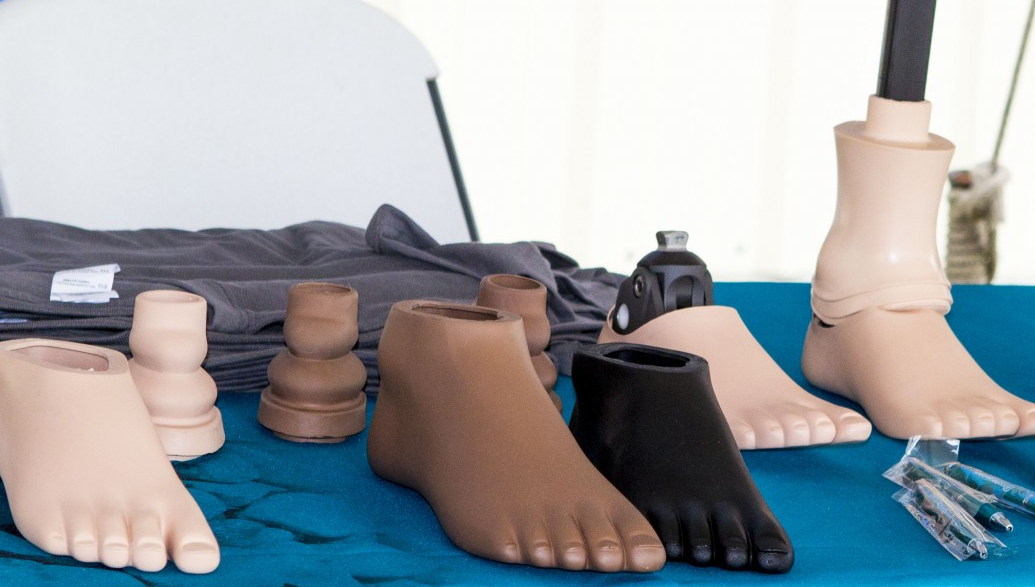
Traditional prosthetic feet (public domain)
Phillips became fascinated with prosthetics and eventually studied prosthetic design at Northwestern University’s Prosthetic-Orthotic Center. He also worked at the University of Utah’s prosthetics laboratory, where he had access to both the people and equipment he needed to experiment.
The conventional wisdom was that a prosthetic foot should imitate a human foot. That seems perfectly reasonable — evolution has had quite a long time to work on the design. But there’s a problem with simply copying the shape. A real foot isn’t just a foot-shaped object attached to the bottom of your leg. Muscles, tendons, and ligaments store and release energy as you walk or run. Your Achilles tendon, in particular, acts very much like a spring. A conventional prosthetic foot might look right, but it didn’t have anything corresponding to that spring.
Phillips eventually stopped worrying so much about making something that looked like a foot. Instead, he decided to make something that worked like one.
Spring In Your Step
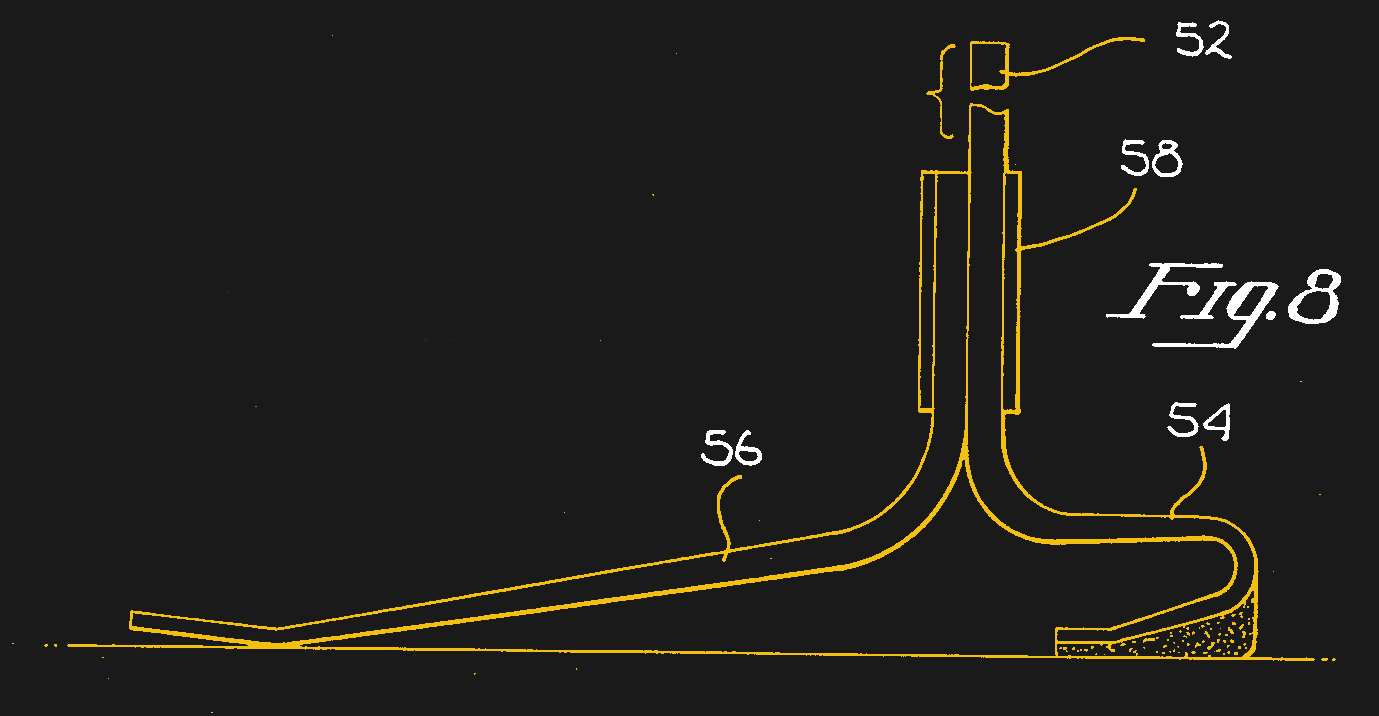
The basic idea behind what became the Flex-Foot is simple, but unobvious: use a spring as the foot. As is often the case, the concept is the easy part. Making a spring that will repeatedly support the weight of a human being, flex the right amount, survive millions of cycles, fit into a practical prosthesis, and not occasionally snap and dump its owner onto the pavement is considerably harder. The answer was carbon-fiber composite.
Today, carbon fiber turns up everywhere from airplanes to bicycles to suspiciously expensive automotive trim. In the late 1970s and early 1980s, though, it was still an exotic material, and the design problem was genuinely nasty. A prosthetic foot spends every waking hour of its owner’s life under cyclic load — tens of thousands of flex cycles a week, millions over a product’s lifetime — with a full body weight snapping through it on every step and several times that on every stride of a run. Get the fiber layup or resin choice wrong, and you don’t get a gentle failure; you get delamination or a sudden snap, with the wearer still attached. Tuning it added another layer: the same blade has to feel right for wildly different body weights and gait styles, which meant iterating on the curvature, the laminate thickness, and where along the blade the flex was concentrated, rather than just picking “carbon fiber” off a shelf and calling it done. Phillips wasn’t merely drawing this stuff on paper, either — he tested prototypes on himself, and by his own accounts the early ones failed more than once before the layup and geometry held up to real use.
Instead of a rigid ankle and artificial foot, the Flex-Foot used a curved composite member extending down the leg and underneath it. When the wearer put weight on the prosthesis, the carbon-fiber structure flexed and stored energy. As the wearer moved forward and unloaded it, the spring returned some of that energy — much closer to what the biological machinery in your lower leg actually does.
Form Follows Function
Phillips founded Flex-Foot, Inc. in 1984, and the design evolved into a family of prosthetic feet. One particularly interesting development was that once you abandon the requirement that a prosthetic foot has to look like a foot, you have quite a bit of design freedom. That’s where the familiar running blade comes from.
The later Cheetah running foot, made by the Icelandic company Össur after it acquired Flex-Foot, takes the idea to its logical conclusion. There’s hardly any pretense that it is an artificial human foot. It is a long, curved carbon-fiber spring, generally shaped something like a J. Load it and it bends. Release the load, and it springs back. If you’ve watched the Paralympics, you’ve almost certainly seen them.
There is something particularly satisfying about the design from an engineering standpoint. Your first instinct is to mimic the original device — in this case, a human foot and leg. Phillips, instead, identified what the system actually needed to do. That’s a lesson that applies well outside prosthetics. Nature’s solution isn’t necessarily the only solution, and copying the appearance of a biological system doesn’t necessarily reproduce its behavior. Airplanes don’t flap their wings, either.
Too Good?
Oscar Pistorius on the run. (by [Elvar Pálsson] CC-BY-2.0)Of course, once prosthetic legs became good enough to let amputees run competitively, an odd question arose: could they become too good? That became a formal legal dispute in 2007–2008, when the IAAF (now World Athletics) moved to bar South African sprinter Oscar Pistorius, a double amputee running on Össur’s Cheetah Flex-Foot blades, from competing against able-bodied athletes.
The IAAF’s case leaned heavily on research from German sports scientist Gert-Peter Brüggemann, who argued the blades were mechanically efficient enough to constitute an unfair aid under the federation’s own rule against springs, wheels, or other advantage-granting devices. Pistorius’s side countered with independent testing led by MIT biomechanics researcher Hugh Herr, arguing there was no measurable edge. When the case reached the Court of Arbitration for Sport in 2008, the panel sided with Pistorius: it found the IAAF had not shown sufficient evidence of a metabolic advantage from using the Cheetah Flex-Foot, and overturned the ban.
That ruling didn’t settle the underlying biomechanics so much as expose how messy the question really is. Running blades are light and return a meaningful share of stored elastic energy, but they aren’t motors — they can’t give back energy that wasn’t put into them, and they lack the active muscle contribution a biological leg supplies, particularly out of the blocks and around a curve. Depending on which variable you isolate — limb mass, ground-contact time, force production, or acceleration mechanics — the prosthesis can look like an advantage or a disadvantage. It’s a genuinely open biomechanics problem dressed up as a sports-eligibility ruling.
The controversy eventually became as much a question about what constitutes a “normal” human body as it was an engineering problem. That’s a pretty remarkable problem for an invention to have. In a few decades, the question had gone from “can we make an amputee walk better?” to “is this prosthetic leg unfair to people who still have legs?”
Better Than A Fake Foot
Flex-Foot was acquired by Össur in 2000. Phillips received the Lemelson-MIT Prize in 1997 and was inducted into the National Inventors Hall of Fame in 2008 — the same year the CAS ruling put his design at the center of a sports-eligibility debate. Descendants of his original design are still in use today: energy-storing-and-returning feet are now an ordinary part of modern prosthetics, and specialized running blades have become almost synonymous with amputee athletics.
Even if you never design a prosthetic, the lesson is a valuable one. When solving a problem, it is natural to mimic something that already exists, either natural or an earlier design. But real innovation often comes when you stand back and consider what you actually need. Not every hole has to be made with a drill.
 Log in